
DeepDojo.AIPublished 2026-11-17中文
Turn a Vague Request Into a Task Codex Can Finish
"Optimize this project for me." Give that line to OpenAI's Codex and it will get to work, but it has to guess the direction. Better button interactions? Faster loading? A component refactor, more tests? If what you actually wanted was to fix the login page, where submitting with an empty email shows no message at all, the odds of it guessing right aren't great.
Even if it guesses right, you're not done. You never said how far to go, so when it comes back, all you have is "optimized." There's nothing you can check.
A clear request needs just four kinds of information:
- Goal: what to accomplish, which behavior to change.
- Context: the relevant symptoms, files, errors, or background.
- Constraints: what it may do and what's off limits.
- Done when: what counts as finished, and how to check it.
With all four in place, write it however feels natural, often in a few sentences. Real requests often bundle several jobs, so split them before you write and hand over one goal per round.
01 Start by Fixing "Optimize This"
Describe the symptom you want solved and Codex gets a clear direction to investigate. Here's the original request:
Optimize this project for me.If the real problem is that submitting an empty email shows no message, say so and most of the guessing goes away. A stronger version:
Fix one bug in the login form with the smallest change you can stand behind:
when a user submits without entering an email, no error message appears.
Start with the login form components and their tests.
Fix only this issue. Don't refactor the login flow.
When you're done, list the files you changed and tell me how to verify the fix.
Now it knows the problem, where to start, and when to stop. Read the last line again and there's still a gap: "tell me how to verify" asks for instructions, not for an actual check. Add: "Submitting an empty email shows a required-field message; submitting a valid email continues as before. Report what you actually checked."
02 The Four Parts of a Task Description
That rewrite breaks down into four parts. Codex's official best practices recommend including the same four in a prompt by default, because they keep Codex in scope, cut down on assumptions, and produce work that's easier to review:
Goal: What am I trying to accomplish?
Context: What symptoms, files, errors, or background matter?
Constraints: What is allowed, and what is off limits?
Done when: What counts as finished?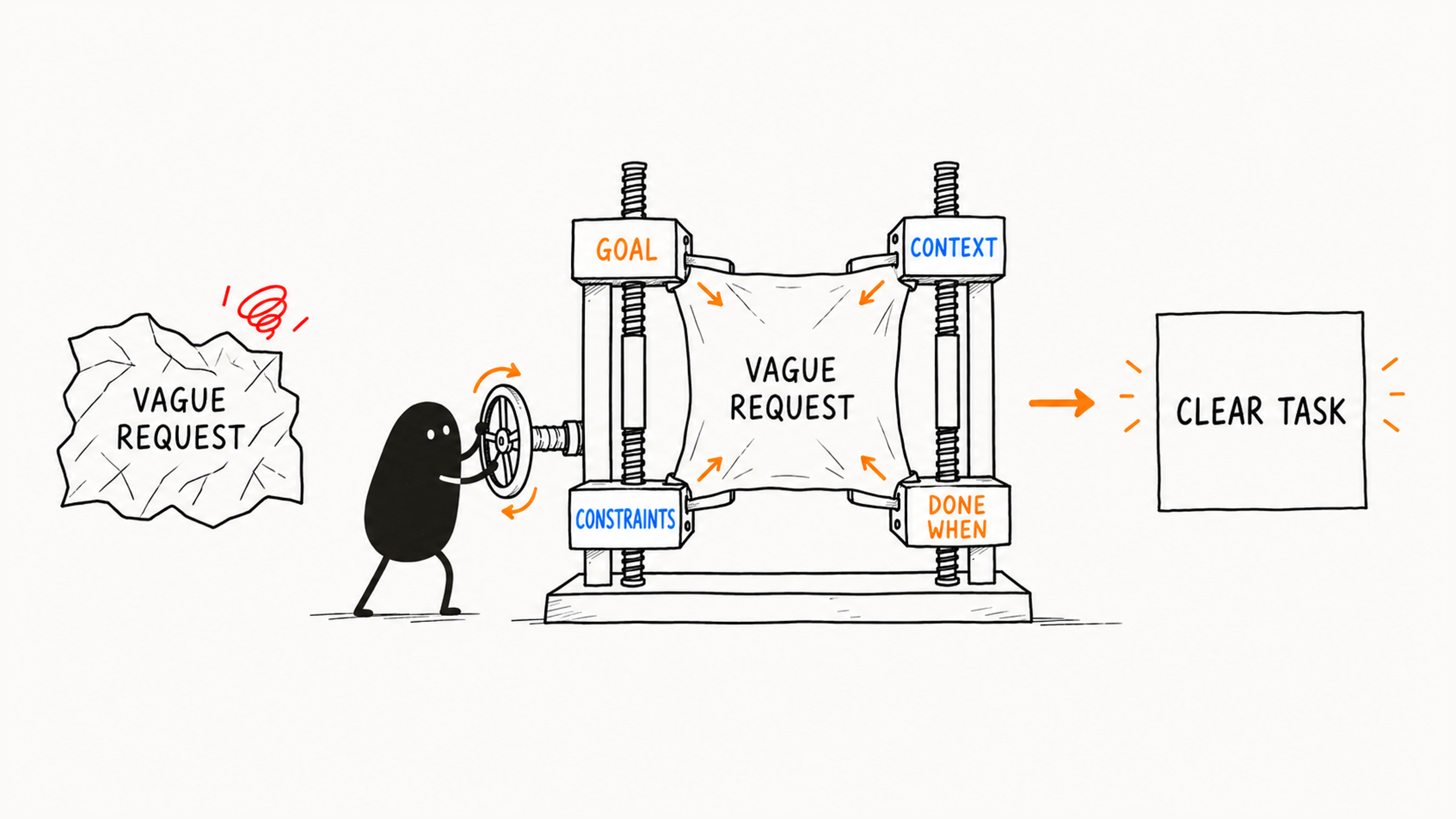
Once you have all four, write them in whatever form suits you. A short task fits in a few sentences. Here's what goes wrong when one is missing:
| Part | What it solves | What happens without it |
|---|---|---|
| Goal | Names the target behavior | It heads the wrong way |
| Context | Points to where to start | It searches too widely or reads the wrong files |
| Constraints | Limits the scope of changes | It refactors shared components or adds dependencies |
| Done when | Gives you a basis for acceptance | All you have is its word |
03 Write Completion Criteria You Can Check
When you write Done when, decide in advance how you'll accept the work. Pick by type of change:
| Type of change | Usable completion criteria |
|---|---|
| Bug fix | The matching test passes, or repeating the original steps shows the problem is gone |
| Copy or style | The new copy or style is visible on the page |
| New tests | The tests run and cover the target branch |
| Read-only analysis | The output cites files and gives recommendations, with no files modified |
Criteria need to be repeatable. "Looks fine" or "better experience" needs to become specific: which button, which field left empty, which message should appear. If an empty email should show "Please enter your email," accept it like this:
| Action | Expected result |
|---|---|
| Open the login page, leave email empty, submit | "Please enter your email" appears |
| Enter a valid email and submit the usual way | The required message disappears and the flow continues |
Check the valid email too, because new validation can break normal submits. The message appearing for an empty value and a valid entry still going through map to two things: this fix, and the behavior you need to keep.
Criteria only need to describe a result you can observe and verify. How to implement it can be left to Codex within the agreed scope. If the page won't run during checking, report which item wasn't done and why. However clear the criteria, someone still has to actually observe the result.
04 Give Only the Background That Affects Decisions
A clear task needs only the background that affects where to look, how to change things, and how to accept the result. Add project history, team discussion, or the full tech stack when the task calls for it.
Worth writing:
When a user clicks Log in on the login page without entering an email, no error appears.
The page is `/login`, and the `LoginForm` component is probably involved.
Usually not needed:
We built this login system last year, redesigned it a few times, the boss never liked the experience, and lately we want all our forms to look the same...Check the background line by line: does it affect where to change, how to implement, or how to accept? If yes, keep it. Unrelated history and discussion can wait until they're needed.
05 Two More Rewrites
Weak request:
Fix the page for me.Better:
Fix the login form so it shows an error when the email is empty.
Start with the login form component and its tests.
Change only the form validation and the error message. Don't touch the auth API.
When you're done, run the relevant tests; if you can't, give me manual check steps.
Weak request:
Take a look at why the tests are failing.Better:
Analyze why the `LoginForm` tests are failing in this project. First confirm the actual test command.
Run or read the relevant test output, then explain the failing assertion, related files, and likely causes.
Don't modify any files yet. Give me a minimal fix plan first.
Once written, check that the four parts can all hold at once. If you ask for a new form message but forbid changes to every form file, you may have ruled out a necessary change. Clarify the scope first. If existing validation conflicts with the new goal, you decide which behavior to keep.
06 One Goal per Request
Real requests often include several jobs. Pack them into one task and Codex juggles several goals at once, and the mixed changes are hard to review. Split them:
Original request:
The login page has problems: an empty email shows no message, the button color is wrong,
add some tests while you're at it, and the validation code is a mess, so refactor it too.

After splitting:
Current task: fix the missing message when submitting an empty email
  Scope: form validation, the error message, and matching tests
  Check this fix with both an empty email and a valid email

Deferred items:
  1. Button color: a separate styling task
  2. Tests for other login scenarios: anything beyond this fix goes in a later task
  3. Validation refactor: have Codex analyze read-only whether the code is really duplicated, then decide
The fix needs evidence, so its matching tests stay in this round. What actually waits is the button color, the other test scenarios, and the refactor, all unrelated to this goal.
After splitting, ask four questions of each piece: one goal? controllable scope? checkable result? acceptable risk? How to judge each is covered in 4 checks before you hand a task to Codex. Deferred items can come later; when their turn comes, write out the goal, background, limits, and checks again.
With the task written clearly, if the code is unfamiliar or the cause still unclear, have Codex investigate read-only next. See how to debug an unclear bug with Codex, read-only first.
Write criteria you can observe and verify, and leave the implementation to Codex within scope. A task handed over that way tells Codex where to go, and tells you what to check when it comes back.